
How to Read IRS Tax Records and Understand Common Transcript Codes

IRS tax records can help taxpayers understand whether a tax return has been processed, whether a payment has been recorded, or whether the IRS has made an adjustment. However, the numbers and transaction codes on an IRS transcript can be confusing if you have never read one before.
An IRS tax transcript is a summary of information from your tax account or tax return. It is not the same as a complete copy of your original tax return. By learning how to identify the transcript type, read its dates, and understand common transaction codes, you can better understand your tax records and determine when you may need to contact the IRS.
What Is an IRS Tax Transcript?
An IRS tax transcript is a document that shows selected tax information maintained by the Internal Revenue Service. Taxpayers often use transcripts to review tax account activity, verify reported income, apply for loans, or investigate refund delays.
The IRS offers several types of transcripts. Each provides different information, so choosing the right one is important.
| Transcript Type | What It Shows | Common Reason to Use It |
|---|---|---|
| Tax Return Transcript | Most line items from the original tax return, generally before later adjustments | Income verification for certain financial or education-related applications |
| Tax Account Transcript | Account activity, payments, adjustments, penalties, and other transactions | Checking payments, adjustments, or account changes |
| Record of Account Transcript | Combines information from a tax return transcript and a tax account transcript | Reviewing both return details and account activity |
| Wage and Income Transcript | Information reported to the IRS by employers, banks, and other reporting entities | Checking reported wages, interest, and other income |
| Verification of Non-Filing Letter | Confirms that the IRS has no processed tax return on record for the requested year, subject to the letter’s scope | Certain applications that require evidence of non-filing |
The transcript you need depends on the question you are trying to answer. For example, a tax account transcript is often more useful when you want to understand a payment or account adjustment, while a wage and income transcript helps you review information reported by third parties.
How to Get Your IRS Tax Transcript
You can request an IRS transcript through the IRS website or use the available alternative request methods.
Follow these steps:
- Visit the official IRS website at IRS.gov.
- Choose the transcript option that fits your needs.
- Sign in to your IRS online account if you use the online service.
- Select the appropriate tax year and transcript type.
- Review the document and look for the transaction descriptions, dates, and amounts relevant to your question.
The IRS also provides other request options for taxpayers who cannot access transcripts online. Availability and delivery times can vary by method and transcript type.
Important: Use the official IRS website when requesting tax records. Protect your Social Security number, account credentials, and other personal information. Avoid sharing a full transcript publicly because it may contain sensitive financial details.
How to Read an IRS Tax Transcript
At first, an IRS transcript may look like a list of unfamiliar numbers and dates. Most entries become easier to understand when you review the document in a consistent order.
1. Check the Tax Period
Start by confirming the tax year or tax period shown on the transcript. A transcript for one year will not necessarily explain activity related to another year.
For example, if you are checking a refund related to a 2025 tax return, make sure you are reviewing the correct tax period. A payment or adjustment shown for a different year may relate to a separate tax obligation.
2. Identify the Transaction Codes
IRS account transcripts use transaction codes to describe activity on a tax account. These codes may identify return processing, payments, credits, adjustments, or other events.
Some codes indicate routine processing. Others may reflect a correction, a review, or an action taken by the IRS.
A code should not be interpreted in isolation. Read the description beside it, check the date and amount, and review any related entries. The same transcript can contain several transactions that work together to explain the account’s status.
3. Review the Dates
Transcripts may include transaction dates, posting dates, and other dates associated with tax processing.
These dates do not always mean the same thing. A date beside a transaction may indicate when the item was posted or recorded rather than the date money reached your bank account.
If a refund is involved, do not assume that every date on the transcript is a confirmed deposit date.
4. Review the Amounts
Look at the dollar amounts associated with each transaction. Depending on the code, an amount may represent a payment, a credit, a tax assessment, an adjustment, or another account entry.
A negative amount does not automatically mean that you owe money, and a positive amount does not always mean that a refund is on its way. The meaning depends on the transaction and how it affects your account.
5. Read Related Entries Together
One transaction may not explain the full picture. A transcript may show an original tax assessment followed by payments, credits, or later adjustments.
Reviewing these entries together can help you understand how the balance changed. If the transcript remains unclear, use the IRS’s official transaction-code resources or contact the IRS for information about your specific account.
Common IRS Transcript Codes and What They Mean
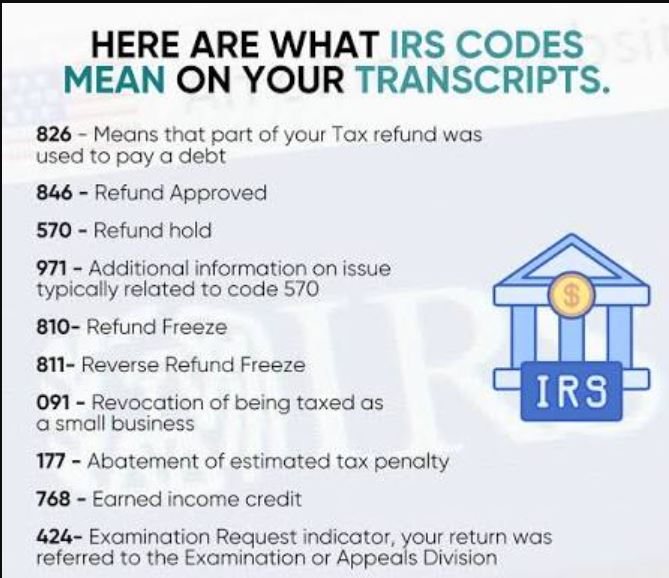
The IRS uses many transaction codes. The following examples are commonly discussed by taxpayers who review their account transcripts.
| IRS Code | General Meaning | What to Know |
|---|---|---|
| 150 | Tax return filed and tax liability assessed | This is generally associated with return processing and an assessment. |
| 806 | Withholding credit | Often relates to federal income tax withheld and credited to the account. |
| 766 | Credit to the taxpayer’s account | The specific reason depends on the transaction and account details. |
| 768 | Earned Income Credit | Generally relates to the Earned Income Credit. |
| 570 | Additional account action pending or processing hold | It can indicate that further processing is needed, but it does not identify the exact reason by itself. |
| 971 | Notice issued or other account action, depending on the transaction | Review the transaction details and any notice sent by the IRS. |
| 846 | Refund issued | It generally indicates that the IRS has issued a refund, but check the associated amount and date. |
These descriptions are general guides, not a substitute for the official IRS transaction-code definitions. Some codes have specific meanings that depend on the account, the transaction, or additional information shown on the transcript.
If you need to interpret several codes together, a detailed guide to IRS transcript codes can help you review their common meanings and understand what additional details to check.
Does an IRS Transcript Code Tell You When Your Refund Will Arrive?
Not every transcript code provides a refund date. Some codes show that a return has been processed, that a credit has been recorded, or that additional action is needed.
Code 846 is commonly associated with a refund being issued. When it appears on your account transcript, review the related date and amount. However, the date shown does not necessarily guarantee the exact day your bank will make the funds available.
Code 570 may indicate that an account needs further processing or review. It does not automatically mean that your return has been rejected or that you will never receive a refund. The reason for the hold may not be clear from that code alone.
If your refund is delayed, use the IRS’s official refund-status tools and review any notices sent to you. Avoid relying on social media posts that promise an exact refund date based on a single transcript code.
What Should You Do If Your Transcript Shows an Unexpected Entry?
An unfamiliar transaction does not always indicate a problem. It may reflect a routine credit, payment, correction, or processing step. However, you should investigate entries that appear inconsistent with your records.
Here are some practical steps:
- Check your own records. Compare the transcript with your filed tax return, payment confirmations, and other relevant documents.
- Confirm the tax year. Make sure the entry relates to the correct tax period.
- Review related codes. Look for other entries that may explain the transaction.
- Read IRS notices. The IRS may send a letter explaining a balance, adjustment, verification request, or other action.
- Contact the IRS when necessary. Use official contact information if the transaction remains unclear or you believe the account is incorrect.
Do not ignore a notice that asks you to respond by a certain date. Follow the instructions in the notice and provide only the information requested through an appropriate channel.
How Taxpayers and Small Businesses Can Keep Better Tax Records
Organized tax records make it easier to review a transcript and resolve questions. This is useful for individuals, freelancers, independent contractors, and small-business owners.
Keep copies of important documents, including:
- Filed federal tax returns.
- W-2 and 1099 forms.
- Records of estimated tax payments.
- Receipts or confirmations for tax payments.
- IRS notices and letters.
- Relevant bank statements and supporting business records.
Maintain a separate record of the date, amount, tax year, and confirmation number for each payment. This can help you compare your records with the entries shown on an IRS transcript.
Business owners should also keep personal and business transactions clearly documented. Good recordkeeping makes tax preparation easier and can help resolve discrepancies when reported income, payments, or account balances do not appear to match.
Store tax documents securely and retain them according to applicable IRS guidance and your individual or business circumstances.
When Should You Seek Professional Tax Assistance?
You may be able to understand routine transcript entries yourself. However, professional assistance can be useful when the transcript shows an unexplained balance, a disputed adjustment, missing payments, or an issue that affects a filing deadline.
A qualified tax professional can help review your filed return, compare it with your account transcript, identify possible discrepancies, and explain what additional documentation may be needed.
If you receive an IRS notice, share the relevant details with your tax professional and pay attention to the response deadline. Do not assume that an unfamiliar code alone establishes that you owe additional tax or that the IRS has made an error.
For account-specific questions, the IRS remains the authoritative source for explaining its records and the status of your account.
Frequently Asked Questions
Is an IRS tax transcript the same as a tax return?
No. A transcript summarizes selected information from IRS records. A tax return is the document you filed with the IRS. If you need an exact copy of your original return, you may need to request a tax return copy instead.
Which IRS transcript should I check for a refund issue?
A tax account transcript is often useful because it shows account transactions, credits, adjustments, and refund-related entries. You can also use the IRS’s official refund-status service to check the status of an individual refund.
Does code 570 mean my refund is denied?
No. Code 570 generally indicates that additional account action or processing may